Introduction
Choosing the right workflow automation platform can feel overwhelming in 2026. With businesses operating across dozens of specialized SaaS applications, manually transferring data between forms, spreadsheets, CRMs, and email marketing platforms is a massive drain on time and productivity. Whether you are an independent freelancer, a small business owner, or a technical developer, automating repetitive tasks is essential to scale your operations.
Educational Comparison Disclaimer: This review provides an independent educational comparison of workflow automation platforms based on 2026 public features, pricing structures, and technical workflows. Platform capabilities and pricing tiers change over time. We do not guarantee specific business efficiencies, financial returns, or rankings. Always verify current documentation and pricing directly on official platform websites.
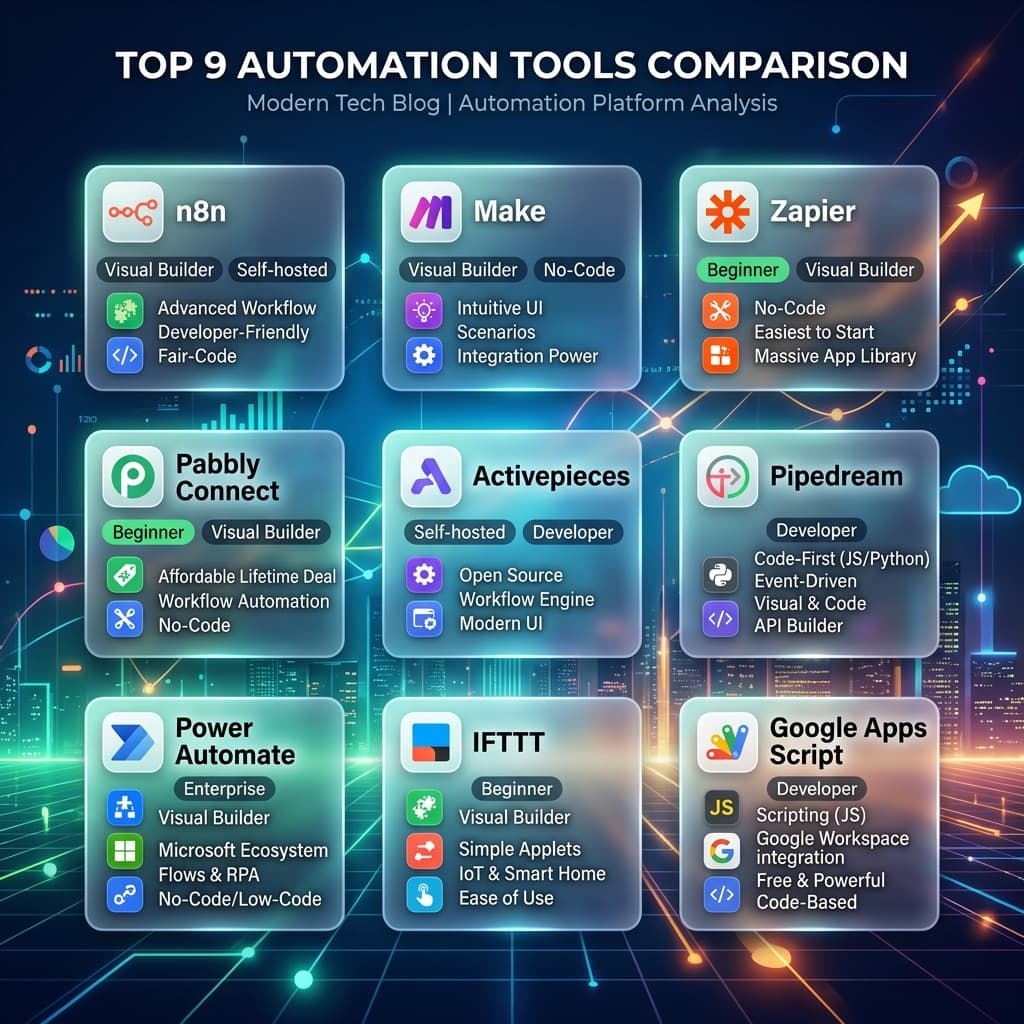
In this comprehensive guide, we compare the top 9 workflow automation platforms on the market: **n8n, Make, Zapier, Pabbly Connect, Activepieces, Pipedream, Power Automate, IFTTT, and Google Apps Script**. We examine their pricing, visual interfaces, self-hosting options, and developer capabilities so you can choose the precise tool that matches your skill level and business needs.
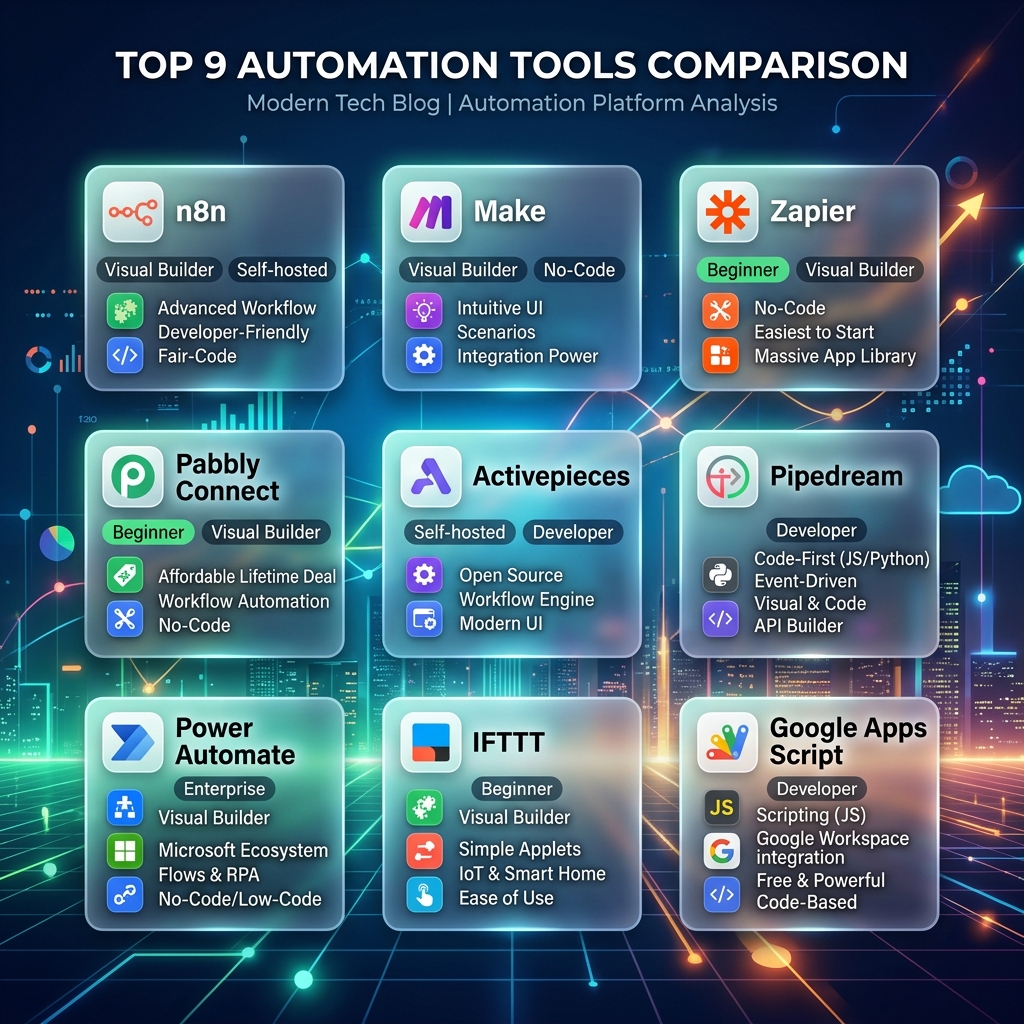
n8n vs Make vs Zapier vs 6 Other Automation Tools: Visual comparison of features, hosting, and skill requirements.
What is Workflow Automation?
Workflow automation is the practice of using software rules to connect separate digital applications so they pass data to each other automatically. Instead of a human manually copying and pasting customer contact details from a website lead form into a spreadsheet, and then writing a welcome email, an automated workflow performs the entire sequence in seconds whenever the trigger event occurs.
Workflow Architecture Blueprint
How workflow automation works
Individual Platform Reviews & Workflow Execution Diagrams
1. n8n (Fair-code & Self-Hosted Powerhouse)
n8n is a fair-code automation platform that stands out for its self-hosting capabilities and developer-friendly node architecture. It allows you to build complex workflows on a visual canvas while retaining absolute control over your server data, making it highly popular among privacy-conscious startups and engineers.
Best for: Developers, agencies, and businesses looking for self-hosted data privacy without per-task execution limits.
n8n Execution Flow Blueprint
2. Make (formerly Integromat - The Visual Canvas)
Make offers one of the most intuitive, drag-and-drop visual canvases on the market. Instead of linear top-to-bottom steps, Make allows you to branch workflows out visually with custom routers, iterators, and error handlers, making debugging incredibly simple.
Best for: Visual thinkers, operations managers, and marketers who want deep multi-step logic without writing code.
Make Execution Flow Blueprint
3. Zapier (The Industry Standard)
Zapier is the pioneer of modern no-code automation. With over 6,000 supported application integrations, Zapier ensures that almost any SaaS tool you use can be connected instantly. While its premium pricing tiers can escalate quickly for high-volume tasks, its reliability and ease of setup remain unmatched for beginners.
Best for: Beginners, non-technical founders, and established teams seeking instant, reliable app connections with zero setup friction.
Zapier Execution Flow Blueprint
4. Pabbly Connect (The Budget-Friendly Option)
Pabbly Connect has gained massive popularity by offering generous task execution allowances and lifetime pricing deals. Unlike platforms that count every internal step or filter check as a billed task, Pabbly Connect often only charges for action executions, making it highly cost-effective for large-scale operations.
Best for: Freelancers, budget-conscious entrepreneurs, and growing agencies looking for predictable, low-cost automation billing.
Pabbly Connect Execution Flow Blueprint
5. Activepieces (Open-Source Simplicity)
Activepieces is an open-source, no-code workflow automation tool designed as a direct, modern alternative to proprietary tools. It combines a clean, easy-to-read visual interface with the flexibility to self-host or use cloud hosting, backed by an active community building new pieces every week.
Best for: Startups and open-source advocates who want a clean UI with self-hosting flexibility.
Activepieces Execution Flow Blueprint
6. Pipedream (The Developer-First Integration Platform)
Pipedream is built specifically for software engineers. While it offers pre-built trigger nodes, its superpower is the ability to write custom Node.js, Python, Go, or Bash code directly inside any workflow step. This allows developers to build complex API integrations, handle webhooks, and process custom payloads with absolute code freedom.
Best for: Software engineers, backend developers, and technical architects building complex API pipelines.
Pipedream Execution Flow Blueprint
7. Power Automate (Microsoft Ecosystem Engine)
Power Automate is Microsoft's flagship enterprise workflow automation tool. It integrates natively with Excel, SharePoint, Outlook, Teams, and Azure services, making it the default choice for enterprises running on the Microsoft 365 cloud ecosystem.
Best for: Enterprise teams, IT administrators, and corporate offices deeply integrated into Microsoft 365.
Power Automate Execution Flow Blueprint
8. IFTTT (If This Then That - Personal Automation)
IFTTT is the original consumer automation app designed for smart home devices, personal social media accounts, and simple life hacks. While it lacks the multi-step branching logic needed for enterprise data pipelines, its one-click applets are fantastic for personal convenience.
Best for: Smart home enthusiasts, personal productivity tracking, and simple one-to-one social cross-posting.
IFTTT Execution Flow Blueprint
9. Google Apps Script (Google Workspace Automation)
Google Apps Script is a JavaScript-based cloud scripting language built directly into Google Drive. It allows you to write custom scripts to automate tasks across Google Sheets, Docs, Gmail, and Calendar with zero external hosting costs.
Best for: Google Workspace power users, spreadsheet administrators, and small businesses running their operations entirely on Google Sheets.
Google Apps Script Execution Flow Blueprint
Which Automation Tool Should You Choose?
With 9 powerful platforms available, choosing the correct tool depends entirely on three factors: your technical comfort with code, your budget for task execution volume, and whether you require cloud-based or self-hosted data storage. Review the decision tree below to find your match:
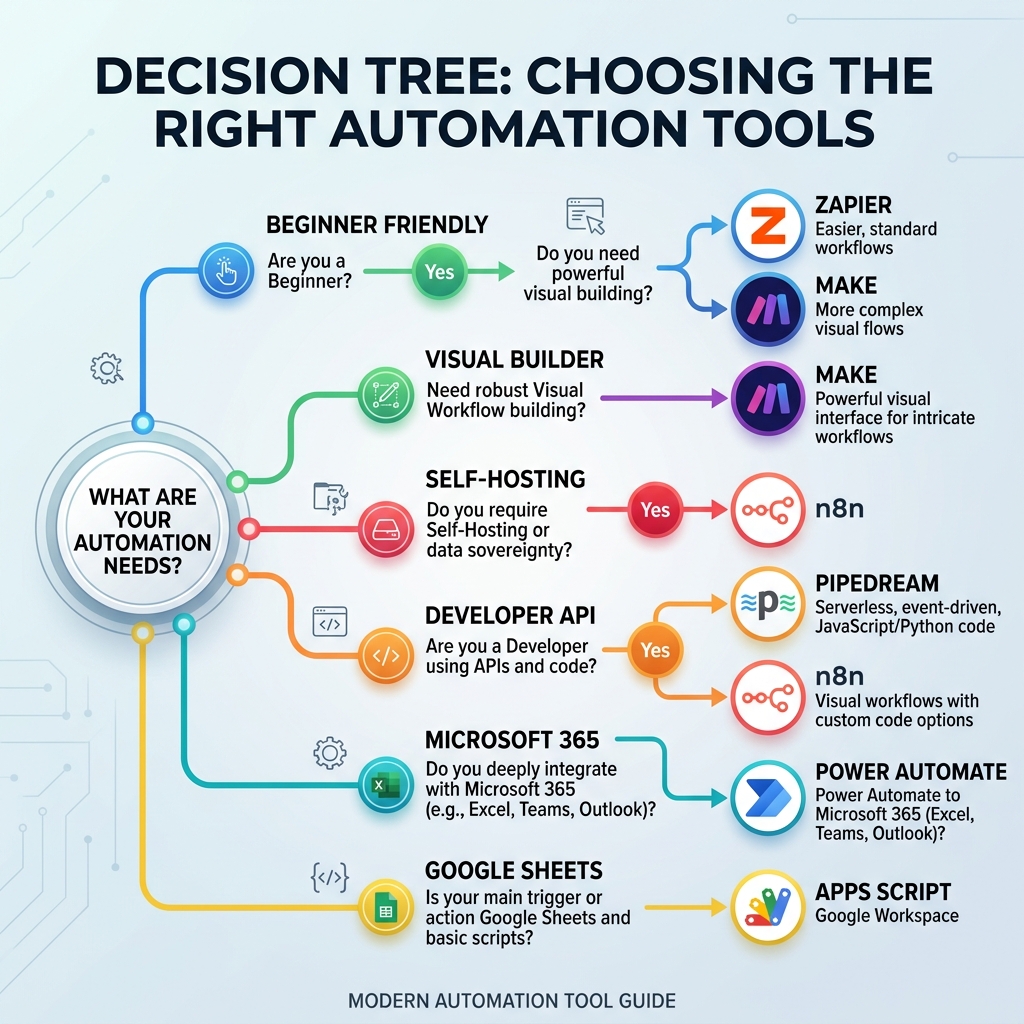
Automation tool decision tree: How to choose based on visual builder preference, self-hosting, and budget.
Comprehensive Feature Comparison Table
Use our responsive comparison table below to evaluate how each platform stacks up across key criteria:
| Tool | Best for | Skill level | Main benefit | Advantage | Disadvantage | Best first workflow |
|---|---|---|---|---|---|---|
| n8n | Self-hosting & privacy | Intermediate / Developer | No task execution limits | Fair-code license | Requires server setup | Lead form to Google Sheets |
| Make | Visual multi-step routing | Beginner / Intermediate | Beautiful visual canvas | Flexible branch logic | Operation limits count steps | Invoice payment reminder |
| Zapier | Instant app connections | Beginner | 6,000+ app integrations | Highest reliability | Expensive premium tiers | New CRM lead email notification |
| Pabbly Connect | Budget-friendly scaling | Beginner | Low per-task costs | One-time payment deals | UI feels slightly dated | Form submission data backup |
| Activepieces | Open-source simplicity | Beginner / Intermediate | Clean open-source UI | Self-hostable | Fewer niche integrations | Discord or Slack alert routing |
| Pipedream | API code pipelines | Developer | Write custom Node.js/Python | Powerful webhook handler | Steep learning curve | Custom API webhook processor |
| Power Automate | Microsoft 365 cloud | Intermediate / Enterprise | Native Microsoft integration | Included in corporate plans | Complex UI permissions | SharePoint file alert to Teams |
| IFTTT | Smart home & personal | Beginner | One-click applets | Excellent mobile app | Lacks multi-step logic | Instagram to Twitter sync |
| Google Apps Script | Google Workspace | Intermediate / JavaScript | Zero execution costs | Direct Drive integration | Requires writing code | Gmail attachment auto-save |
Conclusion
Workflow automation is no longer a luxury; it is a fundamental requirement for operating efficiently in the modern digital economy. By picking the right tool—whether that is the no-code simplicity of Zapier, the visual routing of Make, or the self-hosted power of n8n—you can eliminate hours of manual admin work and focus entirely on growing your business.
Ready to explore automation workflows?
Check out our free, interactive automation guides and ROI calculators on TechIdea.
Publishing checklist
- Confirm the page is not blocked by robots.txt or noindex.
- Use one canonical URL and submit it in the sitemap.
- Add contextual internal links from relevant pages.
- Check title, meta description, image alt text, and FAQ quality.
- Use Search Console URL Inspection after the page is complete.
Mini SEO Title Evaluator
Test your blog title length before publishing to maximize Google click-through rates.
Implementation Checklist
Check off items as you complete them.
Recommended Automation Preview
Click through the workflow steps to visualize how data moves automatically.
Trigger: New Content or Keyword Identified
Put this guide into practice
Explore free client-side tools, AI prompts, and automation templates tailored for this topic.
Interactive Tools
AI Prompt Library
Continue exploring
Useful links from TechIdea
Related tools
Related courses
AI Basics Beginner Guide
Start with models, prompts, limits, and safe AI habits.
Machine Learning Course
Continue from AI basics into practical machine learning concepts.
N8N Automation Course
Master no-code workflow integrations and automation basics.
Practice Quizzes
Test HTML, CSS, and JavaScript basics with instant feedback.
Related posts
Frequently asked questions
Which automation tool is best for beginners?
Zapier and Make are the best automation tools for beginners. Zapier offers the absolute easiest setup with over 6,000 supported applications, while Make provides an incredibly visual, intuitive drag-and-drop canvas.
Can I self-host my workflow automation tool?
Yes. n8n and Activepieces allow you to self-host their platforms on your own server or cloud infrastructure. This ensures your sensitive customer data never leaves your private environment and avoids per-task execution subscription costs.
What is the difference between Zapier and Make?
Zapier uses a linear, step-by-step list structure and supports over 6,000 apps, making it highly reliable but more expensive at scale. Make uses a visual, branching canvas that makes building complex multi-path logic much easier and often offers more affordable tier pricing.
Is Google Apps Script free to use?
Yes, Google Apps Script is completely free to use for anyone with a Google account. It executes directly inside the Google Workspace cloud, making it the most cost-effective way to automate Gmail, Google Sheets, and Google Docs.
Author
Pradeep Ray
Written by Pradeep Ray, founder of TechIdea. He writes practical guides on AI tools, SEO, blogging, online safety, business automation, and digital growth.
Share or save this article
Send it to someone who can use the checklist.
Was this helpful?
Need a custom website, AI tool, SEO setup, or business automation for your business?
TechIdea.online shares free tools and guides. If you need a custom solution, you can contact our team for website development, SEO setup, AI tools, and automation support.
No obligation consultation
Comments
Thoughtful comments are welcome. New comments stay pending until approved by admin.